





Most organisations have now had their first serious conversation about AI assistants. For many, that conversation starts and ends with ChatGPT, because it is the name everyone knows. But Claude, built by Anthropic, has quietly become the tool many professionals reach for when the work involves long documents, careful writing, or sensitive judgement. If you are deciding which assistant your organisation should standardise on, or whether you need both, this guide compares them in plain terms.
We have already compared Copilot vs ChatGPT, which remains the right starting point if your question is about AI inside Microsoft 365. This article looks at the other decision: between the two leading standalone AI assistants.
Key takeaways
- Claude and ChatGPT are both capable general-purpose AI assistants, and for most everyday tasks either will serve a business well.
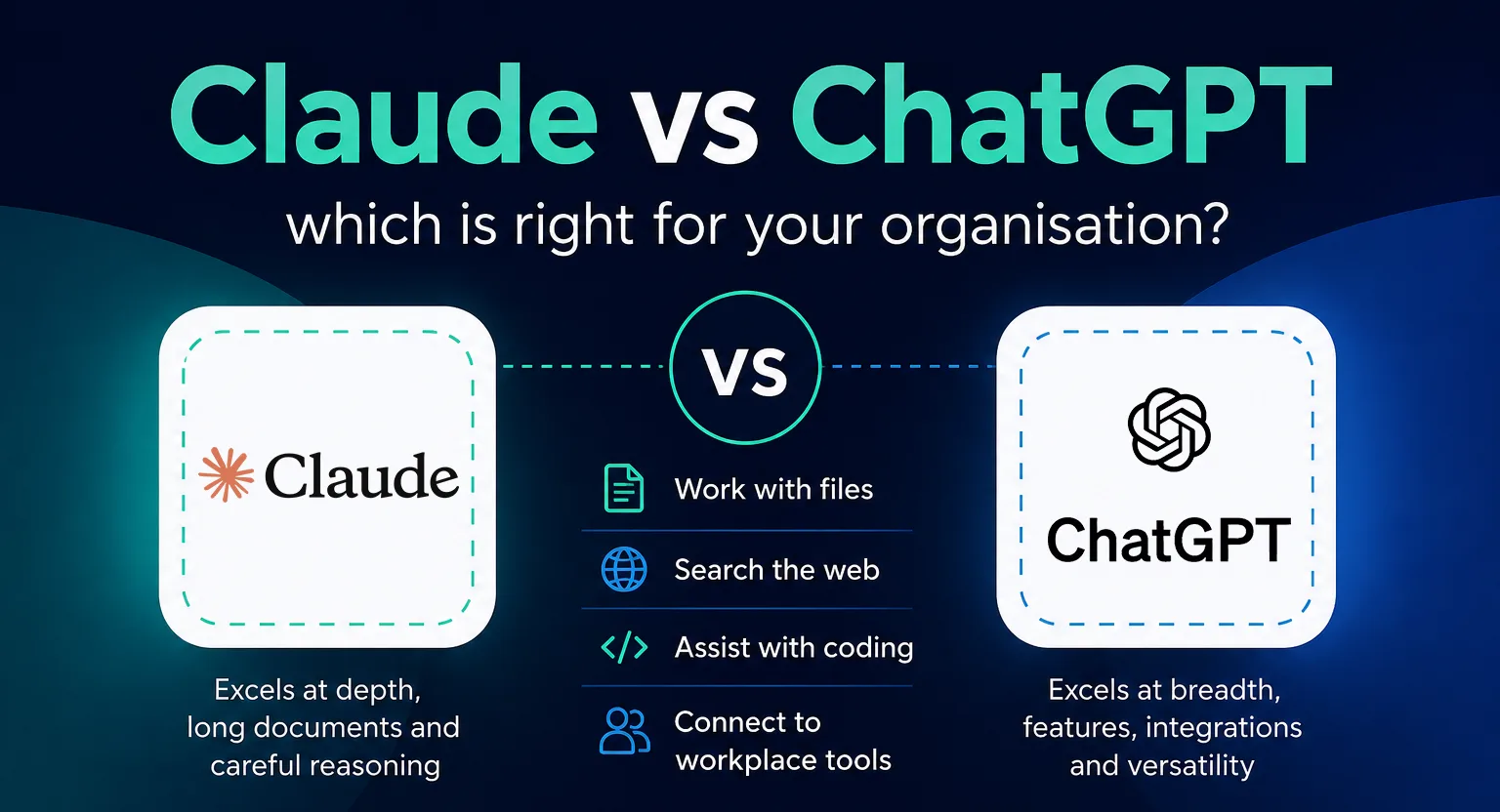
- Claude tends to be preferred for long documents, careful writing and complex reasoning, while ChatGPT offers the broadest ecosystem of features, integrations and plugins.
- Business tiers of both tools exclude your data from model training by default, which personal accounts may not, so the account type matters more than the brand.
- Both are similarly priced per user per month on business plans, so cost is rarely the deciding factor between them.
- The pattern we see most often is staff already using both on personal accounts before the organisation has decided anything, which makes governance the first job, not tool selection.
A brief introduction to each
ChatGPT, from OpenAI, is the assistant that made AI mainstream. It is a general-purpose tool that can draft, summarise, analyse, code, search the web, generate images and hold a voice conversation. ChatGPT offers a broad range of tools, integrations and business features, including GPTs, connected workplace apps, shared workspaces and administrative controls.
Claude, from Anthropic, is a similarly capable general-purpose assistant with a different emphasis. It has built its reputation on the quality of its writing, its ability to work through long and complex documents, and a measured, careful style of reasoning. Its business plans offer shared projects, connectors to common workplace tools, and the same kind of administrative controls organisations expect.
The two tools now have a lot in common. Both can work with files, search the web, help with coding and connect to workplace systems. The real difference is less about what they can do, and more about how they fit the way your teams work.
The key difference
The simplest way to frame it:

Claude is often chosen for document-heavy work, structured thinking and careful writing, particularly where teams are working with large amounts of text.
ChatGPT is often chosen for the breadth of its tools, integrations and workflows, as well as its familiarity to many users.
Neither is “better” in isolation. It depends on how your business operates. A firm that lives in long contracts, reports and board papers may lean one way; a team that wants one tool to draft, generate images, transcribe and automate may lean the other. Many organisations are now using both side by side, in the same way many already pair Copilot with a standalone assistant.
Where each one fits
For everyday administrative work, drafting emails, summarising meetings and answering questions, both are highly capable, and for many routine tasks the practical difference may be relatively small.
The differences show at the edges. If your organisation regularly works with long documents, review packs, policies, contracts or tenders, Claude’s ability to hold and reason over a large amount of text in one conversation is a genuine advantage. Some users prefer Claude for tone and long-form writing, although this is subjective and will vary by person and task.
ChatGPT earns its place through range. Image generation, voice capabilities, GPTs and integrations with workplace tools give ChatGPT a wide range of potential business use cases. If your teams want to experiment broadly and find their own uses, it offers the most room to explore.
A worked example makes the difference concrete. A charity preparing a grant application might give Claude the funder’s guidance, its last three annual reports and a draft budget, and ask for a full first draft in its own voice; that is exactly the shape of task it handles well. The same charity’s communications officer might use ChatGPT in the same week to turn the finished bid into social posts, generate an image for the newsletter and transcribe the trustees’ meeting. Same organisation, two tools, each doing what it is best at.
For technical teams, both are credible coding assistants, and preferences here tend to be individual rather than organisational. It is reasonable to let developers use the one they are most productive with, within the same governance rules as everyone else.

Pricing in plain terms
Pricing is broadly comparable, although the plans have different per-user rates, minimum seat requirements and Enterprise pricing structures. Both offer free and paid individual options, alongside plans designed for organisations. Both vendors adjust pricing and packaging often, so check their current pricing pages before budgeting.
The more useful financial question is who in your organisation actually needs a paid seat. In practice, usage is uneven: some staff will use an assistant all day, others once a week. Starting with paid seats for the heaviest users, and reviewing usage after a quarter, tends to give a truer picture than licensing everyone on day one.
Data protection and governance
This is where the choice matters most, and where the account type matters more than the brand.
On commercial plans, both Anthropic and OpenAI exclude your organisation’s data from model training by default and provide central administration. The exact security and governance controls vary by tier. For example, Claude reserves features such as SSO and audit logs for its Enterprise plan, so organisations should compare the specific controls they need rather than assuming all business plans are equivalent.
On personal accounts, the position is different and the settings deserve checking; we cover this in detail in is ChatGPT confidential, and the same questions apply to any assistant, Claude included.
The practical risk is rarely the vendor. It is a member of staff pasting client information into a personal account the organisation does not control. Under the UK General Data Protection Regulation (UK GDPR), that is your data protection problem regardless of which tool it happened in. Before standardising on either assistant, it is worth agreeing three things: which tool and tier is sanctioned, what categories of information must never be pasted in, and how staff sign in, ideally through company accounts you can see and manage.

Choosing well for your organisation
If you take one thing from this comparison, make it this: the decision is less about picking a winner and more about making a deliberate choice your staff can follow. A sanctioned tool on a business tier, with clear guidance, beats a better tool used quietly on personal accounts.
A sensible route is to run a short pilot of each with a small group who do real work, long-document work for Claude, varied everyday work for ChatGPT, and let the results guide you. Whichever you choose, put it on a business plan, switch on the administrative controls, and tell staff plainly what is allowed. And if your organisation already runs on Microsoft 365, weigh the result against Copilot too, since AI built into your existing workflow may cover some of the same ground.
Choosing the right AI tools is only part of the picture. The bigger question is how to use them safely and effectively across your organisation. Our Harnessing AI workshop helps you explore practical use cases, governance and next steps, so you can approach AI with a clearer plan.
Find out more about our Harnessing AI workshop.
Harnessing AI: A Leadership Masterclass
This masterclass offers AI training to help business leaders to gain a comprehensive understanding of the rapidly evolving landscape of AI and machine learning.
FAQs: Claude vs ChatGPT
Neither is better in isolation. Claude tends to be preferred for long documents and careful writing; ChatGPT offers the broadest feature set and ecosystem. The right answer depends on the work your teams actually do, which is why a short pilot with real tasks beats reading reviews.
On commercial plans, both exclude your organisation’s data from model training by default and provide central administration, although the exact governance and security controls vary by plan. The risk sits with personal accounts, where settings vary and the organisation has no visibility. Sanction a business tier, and be explicit about what must never be pasted into any AI tool.
Yes, and many organisations do, in the same way many pair a standalone assistant with Copilot. Some organisations choose to license both for different roles or use cases. The governance requirement is the same either way. What matters is that both sit on managed business accounts, not a mix of personal ones.
Copilot is AI built into your Microsoft 365 workflow; Claude and ChatGPT are assistants you bring to any workflow. They solve overlapping but different problems, and plenty of organisations use Copilot alongside one of the two. Our Copilot vs ChatGPT guide covers that decision in full.