





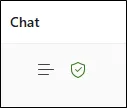
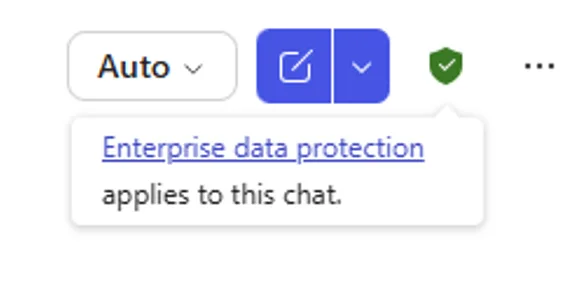
If you are using Microsoft Copilot, you may have noticed a small green shield icon appearing in different places across the interface. It is easy to overlook, and even easier to misunderstand.
The challenge is that Microsoft continues to evolve Copilot rapidly. Features move, labels change and the user experience shifts. As a result, many organisations are not entirely clear on what that green shield represents, or why it should influence how people use AI at work.
Understanding it matters. It links directly to data protection, compliance and how safely your team can use AI tools within your organisation.
What the green shield actually means
In simple terms, the green shield in Microsoft Copilot is an indicator that enterprise data protection is in place for that interaction.
When the shield is present, it generally means:
- Your prompts and responses are not used to train the underlying AI models
- Your data is handled within Microsoft’s enterprise security and compliance boundaries
- The interaction sits within your organisation’s Microsoft 365 environment
Microsoft may change the wording or labels around this, but the principle remains consistent. It is there to signal that you are operating within a business-grade, protected environment rather than a public AI service.
Why it is important for SMEs
For most organisations, the real concern with AI is not capability, it is risk. Teams are already experimenting with tools like Copilot, often without fully understanding what happens to the information they enter. That creates potential exposure around confidential data, client information and internal discussions.
The green shield helps answer a critical question, is this safe to use for business information?
When it is present, it provides a level of reassurance that your organisation’s data protection controls are being applied. That makes it far more appropriate for everyday business use than public AI tools.
Where you might see the green shield
This is where confusion often comes in. The green shield does not always appear in the same place, and in some cases it may not appear at all, even when protection is active.
You may come across it in:
- Copilot within Microsoft 365 apps such as Word, Excel, Outlook and Teams
- The Copilot chat experience when signed in with a work account
- Web-based Copilot when enterprise protection is enabled
- Labels or tooltips that indicate “work” or “protected” mode
However, Microsoft is actively refining the interface. The icon can move, change appearance or be replaced by different indicators. Relying on spotting it visually is not always reliable.
The real risk, false assumptions
One of the biggest issues we see is users assuming that all Copilot experiences are equally secure. In reality, there are important differences depending on how it is accessed and configured.
A user might move between different environments without realising it. For example, switching between a personal account and a work account can look almost identical on the surface, but the data protection behind it can be very different.
This is where problems arise. Sensitive information can be entered into tools that do not have the same safeguards, simply because the experience feels familiar.
The green shield is helpful, but it is not a complete safeguard on its own.

What organisations should do instead
Rather than relying on a small icon, it is better to take a more structured approach to how Copilot is used across your organisation.
A sensible starting point includes:
- Making sure staff understand the difference between personal and work AI tools
- Defining what types of information are appropriate to use within AI tools
- Ensuring Microsoft 365 Copilot is configured with the right security and compliance settings
- Reviewing permissions and data access so Copilot only surfaces appropriate information
It is also important to consider how Copilot interacts with your wider Microsoft environment. The way your data is structured in SharePoint, Teams and OneDrive directly affects what Copilot can access and present.
The aim is to make safe usage the default, rather than something users have to think about every time.
A small icon with big implications
The Microsoft Copilot green shield is a useful visual cue, but it is not the full story.
It indicates that enterprise-grade data protection is in place, which is essential for using AI safely in a business context. However, because the interface continues to evolve, it should not be the only thing your organisation relies on.
What matters most is ensuring your people understand when they are working within a protected environment and when they are not.
That clarity is what truly protects your data.
If you are exploring Microsoft Copilot or already using it across your organisation, it is worth reviewing how it is configured and governed.
Turning Copilot into a secure business tool
ramsac can help you understand where protections apply, how Copilot is interacting with your data and what practical steps you can take to ensure your team is using AI securely and effectively.
Microsoft Copilot green shield: FAQs
It indicates that enterprise or commercial data protection is active, meaning your data is handled within Microsoft’s secure business environment and is not used to train AI models.
It depends on how it is accessed. When enterprise protection is active, it is designed for business use. Without it, the same protections may not apply.
Microsoft regularly updates the Copilot interface. The protection may still be active, but the visual indicator may move or change.
No. It is a helpful indicator, but organisations should still have clear policies, configuration and user guidance in place.
When enterprise protection is enabled, your data is not used to train AI models.
Look for indicators like the green shield or “work” mode, but also confirm your Microsoft 365 setup with your IT provider.
No, and this is why organisations should not rely on it alone to determine whether protection is active.