




Key takeaways
- A Microsoft 365 tenant is your organisation’s own space in Microsoft’s cloud, holding your users, data, permissions and security settings. You used to have a server, now you have a tenant.
- Secure tenant management is the ongoing work of keeping those settings aligned with a standard you have agreed, not a project you finish.
- Tenants change constantly as people join and leave, applications are connected, policies are amended and Microsoft updates its own services.
- Configuration drift happens quietly, usually through small and reasonable decisions that nobody records or reverses.
- Owning Microsoft’s security tools and actively managing your security position are two different things
Most organisations have secured Microsoft 365 properly at least once. Multi-factor authentication was rolled out, policies were written, an audit was passed and the project closed. Some months later, the environment no longer looks the way it did on the day it was signed off. Nothing dramatic happened. It simply changed, one small decision at a time.
The gap between how your Microsoft 365 environment was configured and how it is configured today is what secure tenant management exists to close. Closing it is a management discipline rather than a technical one, which is why it belongs beyond the IT team. A single security review, however thorough, has a limited shelf life.
What a Microsoft 365 tenant actually is
When your organisation signed up for Microsoft 365, Microsoft created a dedicated space for you in its cloud. That space is your tenant. It holds your user accounts, your email, your files in SharePoint and OneDrive, your Teams sites, and the settings that decide who can reach any of it.
Everything you think of as “our Microsoft 365” sits inside it. Your tenant is separate from every other organisation’s, and it is yours to configure. Microsoft secures the underlying platform. The decisions about who can access what, from which devices and under which conditions, sit with you.
That split is why the topic belongs in a leadership conversation and not only in an IT one. The platform’s security is Microsoft’s responsibility. Your tenant’s configuration is yours.

What secure tenant management means in practice
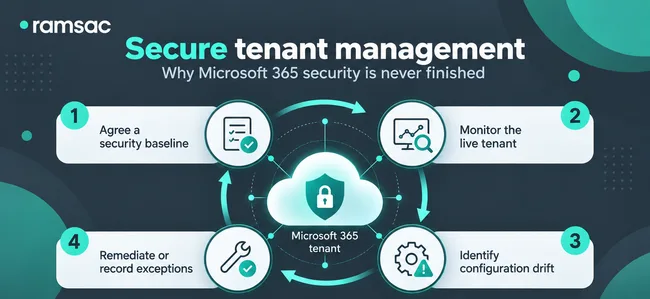
Secure tenant management is the discipline of deciding how your tenant should be configured, then checking continuously that it still is.
It has three parts. The first is agreeing a standard: the set of security and policy settings your organisation expects to be true at all times, often called a security baseline. The second is comparing the live tenant against that standard on a regular basis rather than occasionally. The third is investigating the differences and correcting them, or recording why a difference has been accepted when it is deliberate and required.
None of that is exotic. It follows the same logic as your monthly management accounts. You agree what good looks like, you measure against it on a regular basis, and you act on the variances. Few organisations apply that approach to their cloud configuration, even though the consequences of a variance can be considerably more expensive.
Why your tenant never stands still
A Microsoft 365 environment is not a fixed thing you set up once and leave. It changes most weeks, usually for good reasons.
- People join, change role and leave, and each move alters who holds which permissions.
- Administrators grant elevated access to solve an urgent problem, often intending the change to be temporary.
- New applications are connected to the tenant, sometimes by users themselves, each one carrying its own permissions over your data.
- Policies are amended to unblock a project, a supplier or a senior user who cannot get their work done.
- Microsoft introduces new services or controls, retires older ones and adjusts default settings across the platform.
That last point catches organisations out most often. Your own team did nothing, yet the tenant is not quite what it was, because the platform underneath it moved. Microsoft publishes these changes, but keeping pace with them is a job in its own right.
Configuration drift, and why one-off reviews miss it
Configuration drift is the gradual movement of your live settings away from the standard you intended. It is rarely the result of a mistake. It is often the accumulation of small, well-intended decisions that may have unintentional, wider consequences and may not have been documented – or short-term changes that weren’t then reversed.
Three patterns come up repeatedly. An exemption is added so that one person can work around a policy during a deadline, and it stays in place long after the deadline has passed. Guest accounts created for a project remain active years later, still holding access to the files they were given. A partly completed improvement leaves a gap where neither the old control nor the new one is doing its job. Microsoft’s security defaults, for example, have to be switched off before Conditional Access policies can be used, so a rollout that stalls halfway can leave some accounts less protected than they were before it started.
None of these raise an alert. They surface in an incident, in an audit, or in the security questionnaire a client sends you before renewing a contract.
This is the honest limitation of a one-off security review. A review tells you the state of your tenant on the day it was carried out. It is a photograph, and a useful one. It says nothing about the day after. The environments that cause the most trouble are often the ones that were reviewed properly, then left alone.
Starting from an agreed security baseline
The practical answer is to define what good looks like, then keep checking against it.
A security baseline is a documented set of expectations for how your tenant is configured. It should reflect your risk appetite, your regulatory obligations and the way your organisation genuinely works. Recognised frameworks give you a starting point rather than a blank page: Cyber Essentials, ISO 27001 and the National Cyber Security Centre’s guidance are the ones most UK organisations turn to first.
Once the baseline exists, checking becomes a specific question with a factual answer: does the tenant still match this? The areas that repay regular attention include:
- Coverage of multi-factor authentication, including which accounts are exempt and whether those exemptions are still justified.
- Administrator privileges, and particularly how many people hold the highest level of access. Microsoft’s own guidance is to keep global administrator accounts to the smallest workable number.
- Access policies that govern which devices, locations and applications are allowed to reach your data.
- Authentication methods, because weaker legacy options often stay enabled long after stronger ones are introduced.
- Security settings across email, file sharing and external collaboration, where the defaults tend to favour convenience.
A baseline also improves the conversation at board level. Rather than asking whether the organisation is secure, which nobody can answer honestly, you are asking whether the tenant matches the standard the organisation agreed. That question has an answer, and it can be evidenced.
Having the tools is not the same as managing them
Microsoft 365 includes a great deal of security capability, and the higher licence tiers include a great deal more. Many organisations are paying for protection they have never switched on.
Owning the tools tells you what your organisation could do. Managing the tenant tells you what it is actually doing. The first is a licensing question and the second is an operational one, and only the second reduces risk. A feature that is licensed but disabled protects nobody, and a policy that was right in March is not automatically right now.
It is also why a single security score, taken on its own, is a weak measure. A score tells you roughly where you sit against a general benchmark. It does not tell you whether your tenant matches the standard your own organisation agreed, or which of this month’s changes deserve someone’s attention.
Keeping your Microsoft 365 environment secure over time
At ramsac, we help organisations treat Microsoft 365 security as something that is managed rather than something that is installed. In practice that means agreeing an appropriate security standard with you, monitoring the configurations that matter most, identifying changes and gaps as they appear, and working with you to bring the tenant back into line when it moves.
The benefits are practical rather than abstract. Configuration stays consistent, so the protection you designed is the protection you actually have. Visibility improves, so you can answer auditors, insurers and clients with evidence rather than assurance. Resilience improves, because the openings attackers rely on are so often avoidable ones that nobody had noticed. And the risk of an incident caused by a quietly changed setting comes down.
If you are not certain how your tenant is configured today, the sensible first step is to establish your current position against a documented standard. Our team can do that as part of our cybersecurity audits and ongoing managed cybersecurity services, alongside the ramsac Data Security Framework for organisations that also want to understand where their Microsoft 365 data sits and who can reach it. We are happy to talk it through either way.

How can we help you?
We’d love to talk to you about your specific IT needs, and we’d be happy to offer a no obligation assessment of your current IT set up. Whether you are at a point of organisational change, unsure about security, or just want to sanity check your current IT arrangements, we’re here to help.
FAQs: Secure tenant management
A Microsoft 365 tenant is the dedicated space Microsoft creates for your organisation in its cloud when you first sign up. It holds your user accounts, email, files, Teams sites and all the security settings that control access to them. It is separate from every other organisation’s tenant. In simple terms, the tenant is the new server.
Configuration drift is when the live settings in your environment gradually move away from the standard you intended. It usually happens through small, reasonable changes, such as a temporary exemption or a new application being connected, that are never reviewed or reversed.
Continuously rather than annually. Because permissions, policies and Microsoft’s own defaults change throughout the year, an annual review will miss most of what changed between reviews. The point is to check against an agreed baseline on a regular rhythm and act on what has moved.
Microsoft secures the platform itself. How your tenant is configured, who has access, which policies apply and which security features are switched on remain your organisation’s responsibility. That division is why tenant configuration needs an owner.
It gives you a strong set of security features, but only once they are configured, enabled and kept in line with your standard. A licence on its own changes nothing. The value comes from the settings behind it and from someone checking that they stay correct.
