



Hybrid working is no longer an experiment. For most organisations, it is simply how work gets done. But while employees value flexibility, many businesses are still struggling to make hybrid work feel joined up, efficient and intentional.
That is where Microsoft Places comes in. It is Microsoft’s latest addition to the Microsoft 365 ecosystem, designed to help organisations better understand and manage how people use physical space, while making office time more meaningful.
In this blog, we will explain what Microsoft Places is, what is new, and why it could make a real difference to how your organisation operates.
What is Microsoft Places?
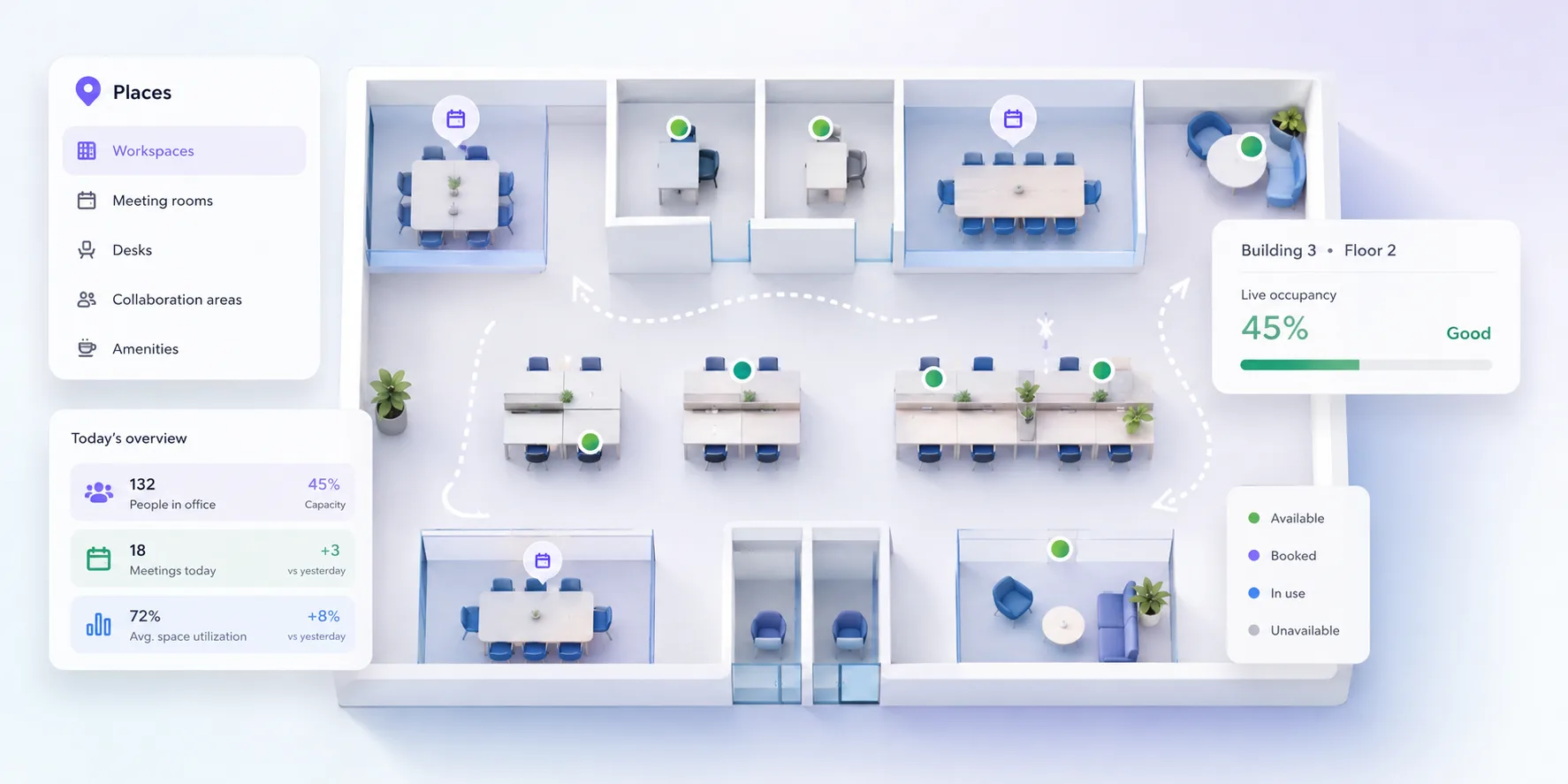
Microsoft Places is a workplace coordination platform built into Microsoft 365. In simple terms, it helps organisations connect people, places and schedules.
Rather than treating the office as just a location, Places turns it into something dynamic. It allows businesses to manage desks, rooms and spaces more intelligently, while giving employees better visibility of when and where colleagues are working.
At its core, Microsoft Places brings together:
- Workspace booking, including desks, rooms and shared spaces
- Presence and location signals, so people can see where colleagues plan to be
- AI-driven insights to help organisations optimise how office space is used
- Integration with tools like Outlook and Teams, so it fits naturally into the working day
The aim is not to force people back into the office. It is to make time spent there more purposeful and productive.

What is new with Microsoft Places?
Microsoft Places builds on features that have been developing across Microsoft 365, but brings them together in a more structured and intelligent way.
Some of the newer and evolving capabilities include:
Better coordination of hybrid schedules
Employees can share when they plan to be in the office, making it easier to coordinate team days without endless back-and-forth messages.
Managers can also get a clearer picture of team patterns, helping them plan collaboration time more effectively.
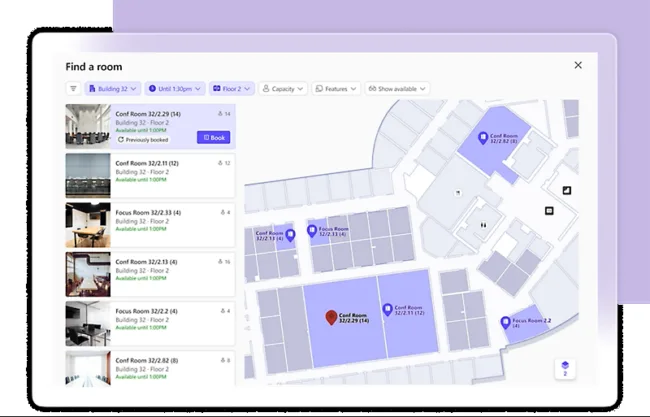
Smarter workspace booking
Booking a desk or meeting room is becoming more intuitive. Instead of just reserving a space, users can choose locations based on proximity to colleagues or team members.
This helps recreate some of the natural collaboration that happens in a fully office-based environment.
AI-powered insights
Microsoft Places uses data to provide insights into how spaces are being used. This can help organisations answer practical questions such as:
❓Are certain offices underused on particular days?
❓Do teams come in at the same time or miss each other?
❓Is there enough collaboration space versus quiet space?
These insights can support better decision-making around office layouts, policies and even property costs.
Integration with Copilot and Microsoft 365
As with many recent Microsoft developments, Places is designed to work alongside AI tools like Microsoft Copilot.
For example, Copilot can help suggest the best days to come into the office based on team activity, or assist with scheduling meetings that align with people’s in-office presence.
Licensing and requirements, what you need to know
Microsoft Places is part of the Microsoft 365 ecosystem, but licensing has recently changed. In April 2026, Microsoft moved some Places features into the core feature set and introduced new space-based licensing for more advanced capabilities.
Core Places features are included with many existing Microsoft 365 and Teams licences. These include capabilities such as work plans, workplace presence, hybrid RSVP, room and workspace booking, desk assignment, Places finder, Places explorer and some analytics.
More advanced features, including individual desk booking, auto-release for rooms and desks, and occupancy reporting, may require Microsoft’s newer space-based licensing. This means the licence is linked to the physical room, desk or shared space, rather than simply being applied to every user.
As with many Microsoft services, the right setup depends on which features you want to use and how your Microsoft 365 environment is configured. It is worth checking the latest Microsoft guidance or speaking to your IT partner before making assumptions.
From a practical perspective, organisations will also need accurate information about users, teams, buildings, rooms and desks, as well as clear hybrid working policies. Without those foundations, even the best workplace technology will struggle to deliver meaningful value.
Why Microsoft Places matters for your organisation
For many SME organisations, hybrid working has introduced new challenges that are not always obvious at first.
You might recognise some of these:
- Offices that feel empty on some days and overcrowded on others
- Teams missing each other despite coming in regularly
- Difficulty justifying office costs when usage is unclear
- Employees feeling disconnected or unsure when to come in
Microsoft Places directly addresses these issues by adding structure and visibility.
It helps organisations move from reactive hybrid working to something more intentional. Instead of leaving it to chance, you can actively shape how and when people come together.
Making it work in the real world
Technology alone will not fix hybrid working. Microsoft Places is most effective when it is part of a wider strategy.
That includes:
- Setting clear expectations about office use, without being overly rigid
- Encouraging teams to plan in-person time around collaboration, not routine tasks
- Using data to review and refine your approach over time
This is where many organisations benefit from external guidance. Understanding the tool is one thing, embedding it into day-to-day operations is another.
Where Microsoft Places fits in your strategy
Microsoft Places represents a shift in how Microsoft is thinking about the workplace. It is not just about communication tools anymore, it is about orchestrating how people, places and technology work together.
For organisations navigating hybrid working, this offers a practical way to improve collaboration, make better use of office space and create a more connected employee experience.
As with any emerging technology, the real value comes from how it is implemented. With the right approach, Microsoft Places can turn hybrid working from a compromise into a genuine advantage.
Ready to make hybrid working work better?
If you are exploring how to make hybrid working more effective, or want to understand whether Microsoft Places is right for your organisation, ramsac can help.
Our team can assess your current Microsoft 365 setup, explain the licensing options and help you design a workplace strategy that works in practice, not just on paper.
Microsoft Places: FAQs
Microsoft Places is used to coordinate hybrid work by helping employees and organisations manage office spaces, schedules and collaboration more effectively.
Some core Microsoft Places features are included with many Microsoft 365 and Teams licences. However, since April 2026, some advanced features use Microsoft’s newer space-based licensing, so availability depends on your licences and the features you want to use.
It improves visibility of who is in the office and when, makes booking workspaces easier and provides data to help organisations optimise office use.
Yes, Places is designed to integrate closely with Microsoft Teams, Outlook and the wider Microsoft 365 environment.
Potentially, yes. By providing data on how office space is used, organisations can make more informed decisions about property and workspace needs.
Yes, particularly for organisations with hybrid teams who want better coordination without adding separate tools.
It uses presence and planned work location information, but organisations should clearly communicate how data is used and ensure it aligns with privacy policies.